Task 09 - Templates type cli (Optional)
Estimated Time to Complete: ~10 minutes
In this task you'll use templates of type cli to inject raw IOS XE CLI commands into your configuration. CLI templates are the escape hatch for features not yet modeled in the IOS XE as Code data model - reach for them rarely, but they're genuinely useful when you need them.
What you'll learn
By the end of this task you will have:
- Created a
cli-type template containing a raw IOS XE command (alias exec logs show logging) - Applied the template globally via
global.nac.yaml - Verified the alias appears on every device using
show alias - Understood when to reach for
clitemplates vsmodel/file(rarely - only for features outside the data model)
CLI Templates
The CLI template type allows you to include raw IOS XE CLI commands that are applied directly to devices. This can be used as a workaround for features not yet supported by the Network as Code IOS XE data model, as it accepts any valid CLI command.
Template Types (reminder):
| Type | Description | Use Case |
|---|---|---|
| model | YAML-based configuration template | Standard configurations (VLANs, ACLs, etc.) ← Task07 |
| file | External .tftpl template files |
Large configurations stored separately ← Task08 |
| cli | Raw CLI commands | IOS XE features not in the IOS XE as Code data model ← This task |
When to use 'cli' templates:
- Unsupported features: Configurations not yet in the IOS XE as Code data model
- Temporary workarounds: Quick fixes before proper Network as Code support is added
Use with Caution
Always prefer model and file templates when possible. They provide dependency handling, better validation, consistency, and they are easier to maintain.
Use case: custom alias for the show logging command
In this example, you'll configure a custom alias command logs that maps to the show logging command. This is a simple yet practical use case demonstrating how to use cli templates to add commands not directly supported by the IOS XE as Code data model.
Step 1: Create the CLI template
First, create the file using your WSL Ubuntu terminal:
Then open data/templates/logging.nac.yaml in VS Code and add the following content:
---
iosxe:
  templates:
    - name: alias_logs
      type: cli
      content: alias exec logs show logging
This template:
type: cli: Specifies raw CLI commandscontent: Contains the actual CLI command to create the alias
Step 2: Apply the template to the global configuration
Now add the alias template to your existing global configuration so that it applies to all devices.
Update data/global.nac.yaml to include the alias template:
---
iosxe:
  global:
    variables:
      SITE: "LTRXAR-2008 Lab"
    configuration:
      banner:
        login: |-
          #########################################
          #                                       #
          #   Welcome to the IOS XE as Code Lab!  #
          #                                       #
          #########################################
          Site:   ${SITE}
          Device: ${HOSTNAME}
      system:
        hostname: ${HOSTNAME}
    templates:
      - alias_logs
Step 3: Deploy the configuration
Open your WSL Ubuntu terminal and run the following steps:
Step 1: Navigate to your project directory:
Step 2: Optionally, preview the changes Terraform will make:
Step 3: Apply the configuration:
When prompted, type yes to confirm the deployment.
View the Merged Model
After running terraform apply, open the model.yaml file in VS Code to see how the alias_logs CLI template is merged with other configurations.
Step 4: Verify the configuration
Use Solar-PuTTY to connect to one of the configured devices (e.g., core switch) and verify that the alias command was successfully added.
After connecting to the device, run the following command to check if the alias was created:
You can also test the alias by running logs from exec mode.
When to use each template type
Now that you've seen all three template types (model in Task 07, file in Task 08, and cli in this task), here's the consolidated decision aid - two questions, three answers:
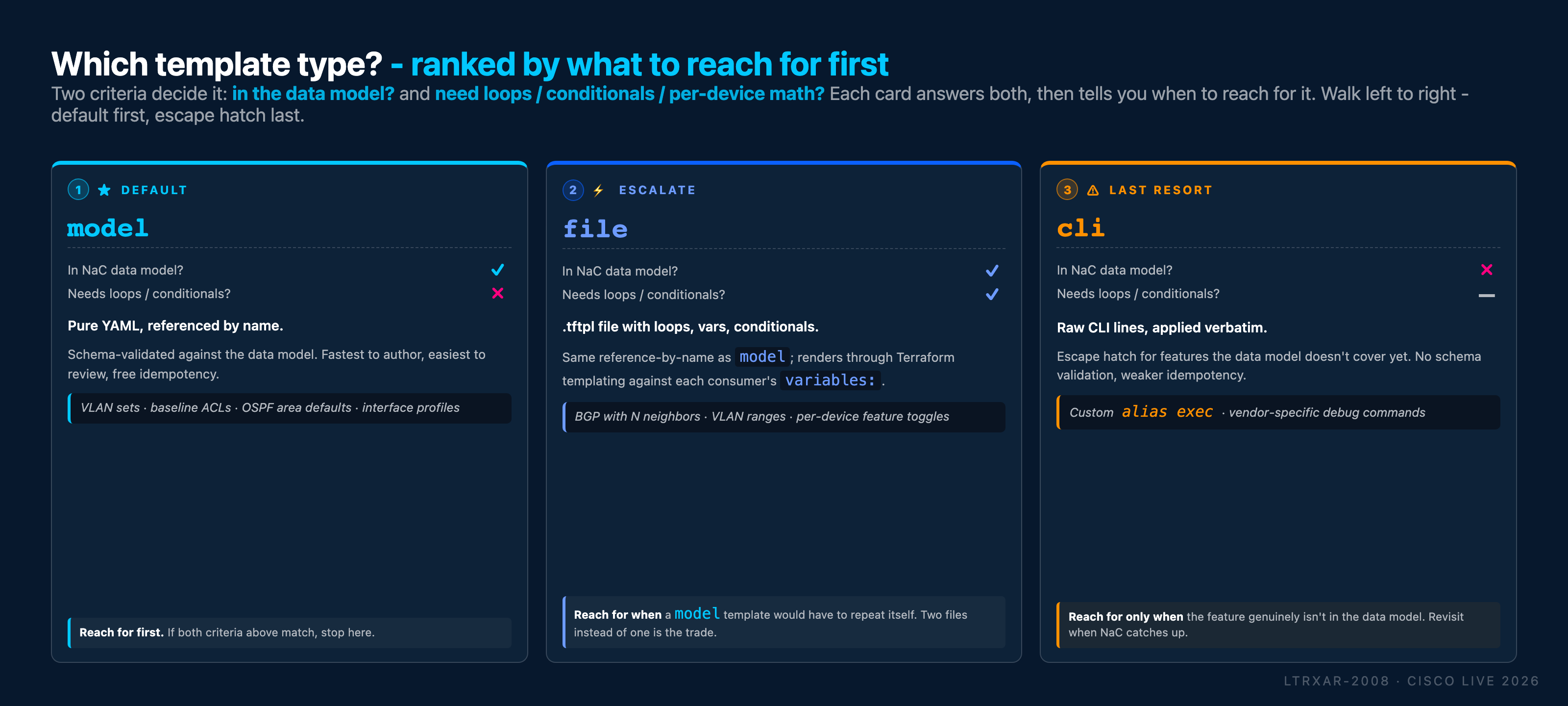
Rules of thumb from the tree:
- Default to
modelwhen the feature is in the data model and your config is straightforward. Fastest to write, gets free schema validation, reads as pure YAML. - Escalate to
filewhen you need Jinja-style loops or conditionals (e.g. "one BGP neighbor per item in this list") or when the config is long enough that a standalone.tftplfile is cleaner than inline YAML. - Reach for
clilast when the feature genuinely isn't in the data model yet. You lose schema validation and fine-grained idempotency in exchange for coverage of edge-case features.
Quick-reference scenario table:
| Scenario | Recommended Type |
|---|---|
| Config that maps directly to the data model and only needs value templating | model |
| Complex config with loops, conditionals, or dynamic structures | file |
| Last resort for features not yet supported in the data model | cli |
What you've accomplished
- ✅ Created a
clitype template with a raw CLI command - ✅ Applied the template to all devices via global configuration
- ✅ Deployed alias configuration
← Previous: Task 08 - Templates type file · Next: Task 10 - Schema validation