Appendix V - Quick reference card
One-page cheat sheet covering everything you need to rerun the lab - at home, on your own devices, or from memory. Bookmark this page; print it if that's your style.
Lab devices
| Device | Role | Mgmt IP | User | Pass |
|---|---|---|---|---|
| core | Core switch (Catalyst 9000v) | 198.18.130.10 |
cisco | cisco |
| border | Border router (Catalyst 8000v) | 198.18.130.20 |
cisco | cisco |
| access01 | Access switch (Catalyst 9000v) | 198.18.130.11 |
cisco | cisco |
| access02 | Access switch (Catalyst 9000v) | 198.18.130.12 |
cisco | cisco |
| isp | Upstream BGP peer (pre-configured) | 198.18.130.200 |
cisco | cisco |
| host01 / host02 | End-hosts (CML console only) | 192.168.100.100/200 |
cisco | cisco |
| ntp-server | NTP service (Ubuntu VM) | 198.18.129.11 |
- | - |
| syslog-server | Syslog service (Ubuntu VM) | 198.18.129.12 |
- | - |
Network as Code manages the top four. The rest are pre-configured and used for verification only.
Lab VMs
| VM | Address | User | Pass | Access |
|---|---|---|---|---|
| Windows 10 | 198.18.133.20 |
admin | cisco | RDP |
| CML | 198.18.130.34 |
guest | CiscoLive | HTTPS |
| Ubuntu | 198.18.133.101 |
guest | CiscoLive | SSH |
| GitLab | 198.18.133.101 |
root | C1sco12345 | HTTPS |
GitLab and Ubuntu share the host (same 198.18.133.101), different services.
Automation seed config (on each Network as Code-managed device)
That's the minimum. restconf + ip http secure-server are optional if you want RESTCONF-based verification as well.
Environment variables
export IOSXE_USERNAME=nac_admin
export IOSXE_PASSWORD=cisco
export IOSXE_PROTOCOL=netconf   # or restconf
Load per-session with source .env, or append to ~/.bashrc for persistence.
NETCONF reachability preflight
ssh -s -p 830 -o StrictHostKeyChecking=no $IOSXE_USERNAME@<device_ip> netconf
Expect an XML <hello> with a capability list. Ctrl+C to exit.
Project layout
~/nac-iosxe/
├── .env                                   # credentials
├── .schema.yaml                           # NaC schema (for nac-validate)
├── main.tf                                # Terraform module configuration
├── data/                                  # your YAML intent
│   ├── devices/core.nac.yaml        # one file per device
│   ├── devices/border.nac.yaml
│   ├── devices/access01.nac.yaml
│   ├── devices/access02.nac.yaml
│   ├── global.nac.yaml             # applies to all devices
│   ├── groups/access.nac.yaml       # applies to ACCESS_SWITCHES group
│   └── template-*.nac.yaml                # optional reusable templates
├── tftpl/                                 # optional .tftpl template files
├── tests/                                 # optional nac-test suite
├── model.yaml        ← generated by `terraform apply`
├── defaults.yaml     ← generated
└── terraform.tfstate ← generated (Terraform state)
main.tf skeleton
module "iosxe" {
  source                    = "git::https://github.com/netascode/terraform-iosxe-nac-iosxe.git"
  yaml_directories          = ["data/"]
  write_model_file          = "model.yaml"
  write_default_values_file = "defaults.yaml"
}
In production, pin to a specific tag: ?ref=v0.12.3.
Module inputs reference
The IOS XE as Code module accepts nine input variables. The lab uses three. Here are all nine, grouped by what they control:
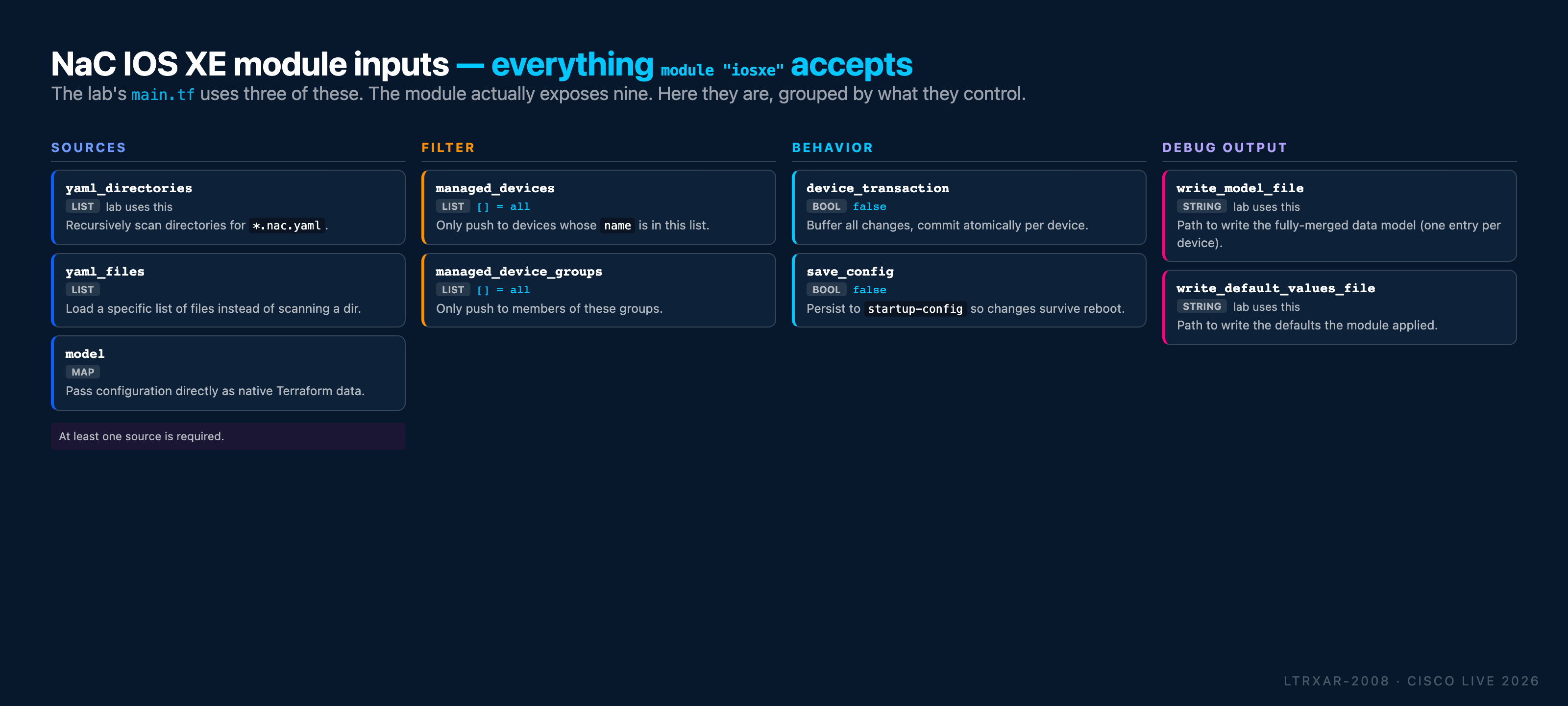
Quick decision table:
| You want to… | Set |
|---|---|
| Scan a directory of YAML files | yaml_directories = ["data/"] |
| Load a specific list of files | yaml_files = ["data/core.nac.yaml", ...] |
| Provide config as a Terraform map | model = { … } |
| Push to only a subset of devices | managed_devices = ["core", "border"] |
| Push to only members of certain groups | managed_device_groups = ["ACCESS_SWITCHES"] |
| Commit atomically per device (multi-RPC safety) | device_transaction = true |
Persist to startup-config so config survives reboot |
save_config = true |
| Write the merged data model for inspection | write_model_file = "model.yaml" |
| Write the resolved defaults for inspection | write_default_values_file = "defaults.yaml" |
Fleet-level vs per-device transactions
Two separate "atomicity" layers are worth distinguishing because they're easy to conflate:
| Scope | Mechanism | Guarantee |
|---|---|---|
| Single device, single apply | NETCONF candidate datastore + <commit> (see Task 01 diagram) |
All RPCs in one Terraform-to-device session commit together, or all roll back. Requires netconf-yang feature candidate-datastore on the device. |
| Multiple RPCs, single apply, same device | Module's device_transaction = true input |
Terraform buffers all changes destined for a device and commits them in one NETCONF transaction. Same guarantee, applied per-device across every changeset Terraform computes. |
| Fleet-level (across devices) | Not available - Terraform applies per-device | If an apply touches 10 devices and device #7 fails, the first six have their changes committed; devices 7-10 don't. There is no "all 10 devices or none" primitive. |
For the lab's 4-device deployment, the per-device transaction layer is what matters. For real production rollouts, plan for the fleet-level case: stage rollouts by pipeline phase, roll back via a subsequent apply that reverses the intent, or use managed_devices to scope the blast radius.
Terraform command reference
| Command | What it does | Changes devices? |
|---|---|---|
terraform init |
Download module + provider, once per project | No |
terraform init -upgrade |
Pull latest module versions | No |
terraform validate |
Check .tf syntax |
No |
terraform fmt |
Auto-format .tf files |
No |
terraform plan |
Diff: desired vs actual. Print the plan | No |
terraform plan -out=plan.tfplan |
Same, save for later apply | No |
terraform apply |
Execute the plan (prompts to confirm) | Yes |
terraform apply -auto-approve |
Apply without confirmation (CI only) | Yes |
terraform apply plan.tfplan |
Apply a previously-saved plan | Yes |
terraform destroy |
Remove all Terraform-managed config | Yes |
terraform show |
Display current state | No |
terraform state list |
List tracked resources | No |
nac-validate - pre-deployment schema check
pip install nac-validate
export PATH=$PATH:~/.local/bin

# Validate every YAML under data/ against .schema.yaml
nac-validate -s .schema.yaml data/
Exit code 0 = valid. Non-zero + ERROR - Syntax error ... = something's wrong. The error message names the exact merged-model path at fault.
nac-test - post-deployment verification
pip install nac-test

# Assumes `tests/` directory is present (see Task 11)
nac-test \
  --data ./model.yaml \
  --data ./defaults.yaml \
  --templates ./tests/templates \
  --filters ./tests/filters \
  --output ./tests/results
Artifacts in ./tests/results/:
report.html- human-readable summary, open in browserlog.html- step-by-step execution logxunit.xml- JUnit XML for CI integration
GitLab CI/CD stages
| Stage | Job | Runs on MR? | Runs on main? |
|---|---|---|---|
validate |
terraform fmt -check, nac-validate |
✅ | ✅ |
plan |
terraform plan + post plan to MR comment |
✅ | ✅ |
deploy |
terraform apply -auto-approve plan.tfplan |
❌ | ✅ |
test |
nac-test integration + terraform plan -detailed-exitcode idempotency |
❌ | ✅ |
notify |
Webex / email on success or failure | ❌ | ✅ |
MR pipelines are preview-only. main pipelines deploy.
Further reading
- netascode.cisco.com - Network as Code data models + tool docs for IOS XE, SD-WAN, ACI, Catalyst Center, Nexus Dashboard
terraform-iosxe-nac-iosxe- the module used in this lab (Apache 2.0)terraform-provider-iosxe- the IOS XE Terraform provider underneath- netascode on GitHub - all the modules, tools, and data models
← Previous: Appendix IV - ISP Router Configuration